
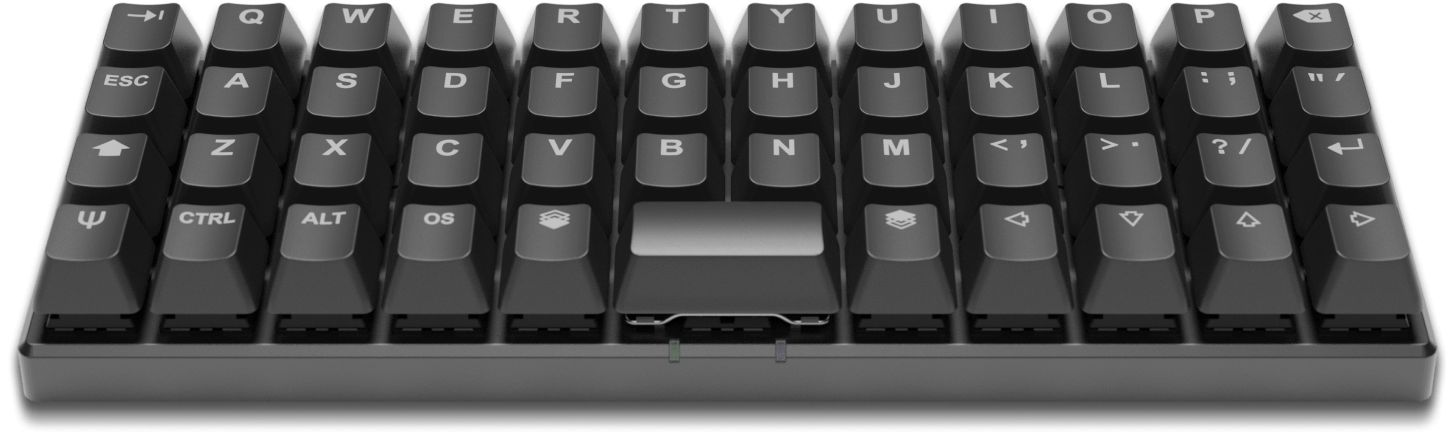
RGB Backlight? Check. Powerful open-source firmware? Check. Graphical configurator? Check. This keyboard has it all — 47 keys is all you are going to need. This compact keyboard impressed me as a possible good condidate for me or others who use a mouthstick or others who have a limited field of movement. Would love toContinueContinue reading “Planck EZ: A Powerful, Backlit, Open-Source, 40% Mechanical Keyboard | Planck EZ”
Category Archives: Typing
Faraday Stylus’ new capacities program
Just came across the iFaraday stylus via a blog post on ATMac. All their stylus’ look good and I’m impressed with their “new capacities” program which states Our goal is to enable anyone who wants to use a capacitive touch screen device. We have three working designs that enable folks to use a capacitive touchContinueContinue reading “Faraday Stylus’ new capacities program”
DwellClick
DwellClick lets you use your Mac without clicking. You point, it clicks . DwellClick will drag for you. Point at windows and resize areas to auto-drag, and use the control panel for anything else. Save thousands of clicks per day. Drag hands-free with total control.What is dwell clicking?Dwell clicking enables clickless operation of your computer.ContinueContinue reading “DwellClick”
Azio Large Print LED Keyboard
Azio Large Print LED Keyboard Print on keys is 2x the size of standard keys reducing eyestrain Backlit keys are ideal for low light 3 backlit colours Shortcut keys http://www.aziocorp.com/product/keyboards/wiredkbmain/kb505u.htm
The MaKey MaKey configurable input system
It’s amazing how many times some creative, fun thing gets invented for basically ‘play’ that can be used in an alternate scenario for such real world benefit. Such it is with this MaKey MaKey system that allows anything to be an input device. This really got my brain whirring as to how many ways thisContinueContinue reading “The MaKey MaKey configurable input system”
Apple keyboard & touch pad tray
The Combine collective is a group of like minded artists working together to achieve a common goal. They have come out with these stylish keyboard trays, designed to combine the mac wireless keyboard and trackpad into one clean unit. It occurred to me that this idea could be good for people requiring a way ofContinueContinue reading “Apple keyboard & touch pad tray”
Keyboard Navigation extension for Chrome
Came across an interesting, potentially useful tip on a extension for the Chrome web browser called “Keyboard Navigation”, on the excellent blog makeuseof.com. From the blog: The extension defines a hot key (,) which places a hint next to every link on the page that can be clicked. While the hint is displayed, key inContinueContinue reading “Keyboard Navigation extension for Chrome”
ThinkPad keyboard with TrackPoint
Combining pointing devices with keyboards is great for those with limited reach / movement and mouth stick users. ThinkPad keyboards are fantastic. To have em as a desktop kb would be great. [New ThinkPad keyboard features crowdsourced design, lower price]
Adesso compact wireless keyboard
Nice compact, wi-fi keyboard, useful for limited reach. And no cords. Non-multi touch pad is a positive in my opinion. Would love to test the pad. [via engadget ]
Colour-coded Keyboard & Mouse
This keyboard has color coded keys to teach consonants vs. vowels in order to assist kids become better spellers as well as different colors for the control keys and numbers.. I figure the extra visual feedback offered by the colour coding on this keyboard has to have additional application in areas involving cognition. [Via: ThinkGeekContinueContinue reading “Colour-coded Keyboard & Mouse”
Dasher – Single Finger Alternative Text Input
A video demo of Dasher. A single finger interface that allows you to enter text without a keyboard. Dasher is free software, and it works in all languages, and on many platforms. Keyboards are inefficient for two reasons: they do not exploit the redundancy in normal … all » language; and they waste the fineContinueContinue reading “Dasher – Single Finger Alternative Text Input”
Ergodex customisable input system now for Mac
Update Jan 2021: Ergodex is now Ergodox When I heard about this Ergodex customisable keyboard on a podcast I immediately thought it would have uses in Assistive Technology circles and yes, they do already have information on such application of the device. As it happens, this device has been around a while but only forContinueContinue reading “Ergodex customisable input system now for Mac”
The touch barrier — responses
After my previous post about the “Touch Barrier” as referring to the inherent issues of the pervasive use of touch technologies I had some good responses. @lucychili pointed me to work Peter Hutterer is doing with MPXLaurel wrote a blog post “Disabilities social networks games” pointing to a article DISABLED GAMERS’ COMPRISE 20% OF CASUAL-VIDEOGAMEContinueContinue reading “The touch barrier — responses”
Vista Voice Recognition
All throughout my life with technology I’ve used add-on software to help kludge my way around. Macs had accessibility features built right in from the word go – though mouse-drags were problematic. DOS & early Windows required external software to handle mouse-drags until the click-lock functions appeared in XP. It seems given time OS softwareContinueContinue reading “Vista Voice Recognition”
Keyboards with large print
“Keys-U-See large print keyboards have been designed specifically for those with conditions that cause visual impairment or low vision. … These large print keyboards are also perfect for those who simply have a hard time seeing the existing commands on thir keyboards. With a bigger and bolder typeface, the keys are easier to see.”
Thunderbird’s QuickText
There’s a great extension for the equally great open source email program, Thunderbird called QuickText. This bit of software is installed in Thunderbird and acts like a macro typing device that can input long pieces of text with few keystrokes or the click of a button. QuickText is especially for email as it can recognizeContinueContinue reading “Thunderbird’s QuickText”
Colourfull keyboard
These coloured keyboards are aimed at the childrens market. I wonder though if they could be useful for anyone with colour perception issues or who might require some added visual clues to assist with typing. The culours offer great contrast and the grouping of similar function keys by colour could help with association and usability.ContinueContinue reading “Colourfull keyboard”

