
Microsoft Live Captions A chance typo (Win/Ctrl/L) brought t my attention that Microsoft (MS) actually provides a lot of captions at a system level that will in real time like captains of any audio played. It even will transcribe buit-in access features like Narrator and Read Aloud. I often use closed captions on youtube, howeverContinueContinue reading “Live Captions for everything on MS Windows 11”
Category Archives: access
SNOWL – The Mouse Reimagined
Snowl is a wearable ring-shaped device that brings 3D range of motion to devices that are traditionally 2D such as touch screens and computer mice. With Snowl, you can experience precision control over your favorite devices through three motion tracking modes: Air Mouse mode, Gesture Mouse mode Joystick Mouse mode.COXSPACE
Planck EZ: A Powerful, Backlit, Open-Source, 40% Mechanical Keyboard | Planck EZ
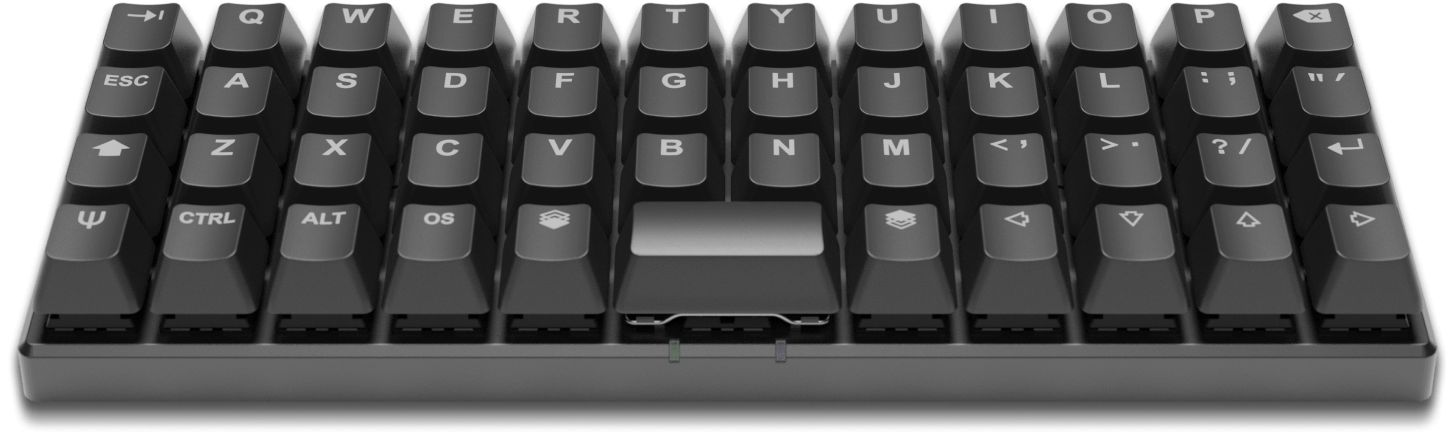
RGB Backlight? Check. Powerful open-source firmware? Check. Graphical configurator? Check. This keyboard has it all — 47 keys is all you are going to need. This compact keyboard impressed me as a possible good condidate for me or others who use a mouthstick or others who have a limited field of movement. Would love toContinueContinue reading “Planck EZ: A Powerful, Backlit, Open-Source, 40% Mechanical Keyboard | Planck EZ”
Microsoft CEO Satya Nadella on Accessibility and AI
For over 30 years I’ve believed and said people living with disability stand to benefit the most from technology as a tool. So good to see Accessibility being thought, talked about and more inportantly actioned at high levels in companies. Marques talking with Satya Clip from a video by Marques Brownlee (MKBHD) on Youtube. TranscriptContinueContinue reading “Microsoft CEO Satya Nadella on Accessibility and AI”
Apple’s Voice Control in iOS13 is the real deal
A friend on Twitter asked my impressions on Voice Control. That prompted me to finally install iOS13 and give it a go. I am very enthused by the result. Voice Control acts just like most Apple products do – they do what they say and they show thought and attention to detail. It’s a gameContinueContinue reading “Apple’s Voice Control in iOS13 is the real deal”
Siri Shortcuts stands to be a boon for people living with disability
I watched the Apple WWDC presentation this morning and was excited to see the announcement of Shortcuts. Siri Shortcuts Streamline the things you do often with shortcuts. Siri can now intelligently pair your daily routines with third-party apps to suggest convenient shortcuts right when you need them. So if you typically pick up a coffeeContinueContinue reading “Siri Shortcuts stands to be a boon for people living with disability”
UXMAS advent calendar for UX folk. | accessibility news
It’s on again. The excellent UXMAS advent calendar for UX folk.
Windows 10 free upgrade offer still on for AT users
Microsoft continues to support a free upgrade to Windows 10 for people who are using Assistive Technologies (AT) in Windows 7, Windows 8 or Windows 8.1, despite officially ending their promotional offer on 29 July 2016. Curated by (Lifekludger) Read full article at Source: Windows 10 free upgrade offer still on for AT users |ContinueContinue reading “Windows 10 free upgrade offer still on for AT users”
Aipoly – Vision Through Artificial Intelligence
We help the blind and visually impaired quickly identify objects using affordable, cutting-edge technology. Source: Aipoly – Vision Through Artificial Intelligence
If the iPhone 7 removes the Home button it will become less accessible
Techinsider recently posted a roundup of rumours expected for the iPhone 7. One in particular has me worried for the future if it comes to fruition. It’s rumoured the home button could be replaced by a touch sensor. Not being able to have a physical button to press would spell the end of the phone’s usefulnessContinueContinue reading “If the iPhone 7 removes the Home button it will become less accessible”
Don’t let a disability stop you from using your smartphone
http://c.brightcove.com/services/viewer/federated_f9?isSlim=1 Watch video from usatoday Apple CEO Tim Cook recently tweeted, “Accessibility rights are human rights. Celebrating 25yrs of the ADA we’re humbled to improve lives with our products. #ADA25.”Apple and Google have baked strong accessibility tools into the iOS and Android ecosystem, respectively. While some tools are meant to complement third-party devices, from hearing aidsContinueContinue reading “Don’t let a disability stop you from using your smartphone”
Special Stylus solutions by shapedad on Etsy
Shapedad is an outlet on Etsy that provides custom solutions for stylus’ for touch screens in many formats. Shapedad says: “It all started when the wife of a quad (quadriplegic) patient ordered a regular Stylus Socks stylus from our Etsy shop.” Some examples below: ContinueContinue reading “Special Stylus solutions by shapedad on Etsy”
DIY door lock for smartphone accessibility by Sony
sony’s DIY ‘qrio’ smart lock clips onto door for smartphone accessibility via source: http://www.designboom.com/technology/sony-qrio-smart-lock-12-14-2014/
App for deaf people to ‘hear’ group conversations
Smart, very smart use of technology to enhance lives. Researchers have developed the first mobile app to make group conversations possible between deaf people and their hearing peers. The Transcense app “listens” and interprets conversations, providing real-time captioning on mobile devices. http://youtu.be/vvoglCTd6x8 Indiegogo campaign : https://www.indiegogo.com/projects/transcense-group-conversations-made-accessible Transcence website : http://www.transcense.com/ via [New app letsContinueContinue reading “App for deaf people to ‘hear’ group conversations”
Commodity Environmental Control – The Smart Home and Accessibility | TechCrunch
Techcrunch feature an good article on the smart home and accessibility. For over thirty years I’ve been kludging ways to control what I can around me. There’s a whole field of rehabilitation technology centred around what’s termed “environmental control”. All this time I’ve dreamed of the day when this stuff – what you could call ‘lazy-man’ tech.ContinueContinue reading “Commodity Environmental Control – The Smart Home and Accessibility | TechCrunch”
Apple’s App Review Should Test Accessibility – Marco.org
Marco has a great post outlining why Apple (among others) should require accessibility of an app before releasing it. The closer to the design end of the development curve that accessibility is included, the better. Poor or broken accessibility is exactly the sort of problem that Apple’s App Review team should check for: many developersContinueContinue reading “Apple’s App Review Should Test Accessibility – Marco.org”
The Great Automatic Light Saga or How to control a WeMo light from your PC
Summary: Control a lamp with a script on your PC via WiFi and a WeMo Switch This is going to get a bit convoluted so try and stick with me. I moved house the end of last year and, as happens every time, I left behind all the alterations and small tweaks I’d done toContinueContinue reading “The Great Automatic Light Saga or How to control a WeMo light from your PC”
DwellClick
DwellClick lets you use your Mac without clicking. You point, it clicks . DwellClick will drag for you. Point at windows and resize areas to auto-drag, and use the control panel for anything else. Save thousands of clicks per day. Drag hands-free with total control.What is dwell clicking?Dwell clicking enables clickless operation of your computer.ContinueContinue reading “DwellClick”
Reader Writes: Another alternative for a touch mouthstick
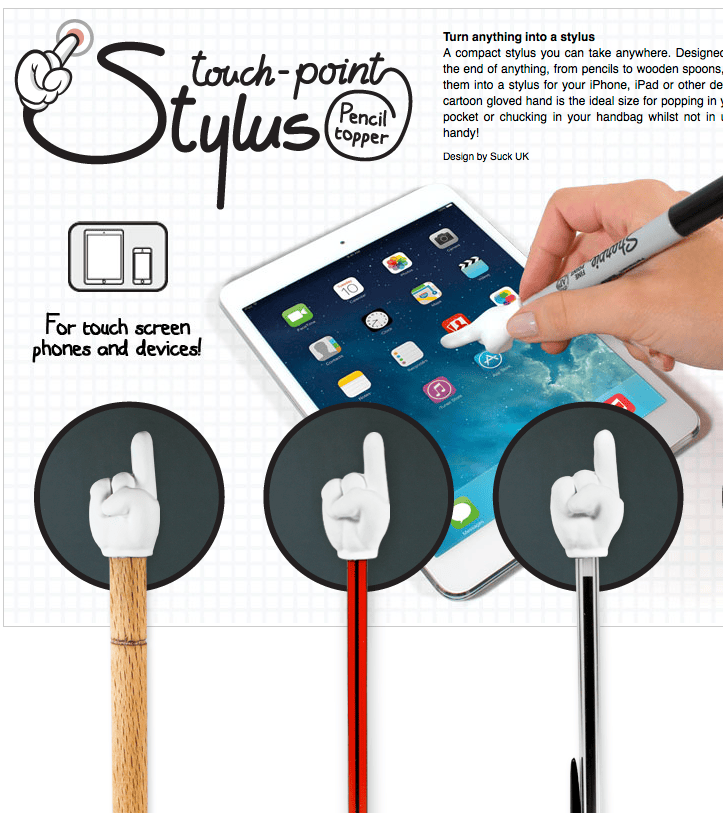
Overcoming the “touch barrier” I received a message the other day from a reader … in …. Michael writes: Please see the attached [link for] pencil tops or stick tops – or whatever you’re having yourself – tops. I have been using something similar from the same website for some time. They are effectively noveltyContinueContinue reading “Reader Writes: Another alternative for a touch mouthstick”
HandsFree, a Mac app worth $4.99 in the Mac App Store, that uses your Mac as a…
Reshared post from +David N Wallace HandsFree, a Mac app worth $4.99 in the Mac App Store, that uses your Mac as a handsfree device by routing the audio from your Android phone or iPhone to your Mac. (Needs OS X 10.9)* HandsFree Lets You Make & Receive Phone Calls On Your Mac There are thoseContinueContinue reading ” HandsFree, a Mac app worth $4.99 in the Mac App Store, that uses your Mac as a…”
Pressy – a smartphone task button
The Pressy is a tiny, simple button that you plug into the headphone jack of your phone that allows you to easily access a regular task. It uses an app that lets you setup the presses it takes to perform certain functions. Clicks are similar to Morse Code and are comprised of long and shortContinueContinue reading “Pressy – a smartphone task button”
Kwikset Kevo smart lock
Kwikset are a leading brand of door hardware and home improvement. The Kevo smart lock is a Bluetooth-enabled deadbolt that will turns your iPhone into your housekey. The Kevo smart lock gives you the ability to unlock the door with a smartphone, accompanied by a simple touch. Electronic keys (eKeys) can be sent to family, friendsContinueContinue reading “Kwikset Kevo smart lock”
Much awaited new Accessibility feature – iOS 7 Switch Control
From the AblenetInc youtube page comes some info on Switch Control in iOS7 “iOS 7 includes a powerful new accessibility feature, Switch Control. For users with significant physical disabilities, Switch Control is a much needed feature that provides access to almost every feature in iOS 7 through the use of one or multiple switches.” [wp_youtube]fqWkNxB27DM[/wp_youtube]
Captionfish: A captioned movies search engine
Stumbled across this service the other day. Lists captioned movies and TV shows as well as a search facility. You can customise results to shown within a certain area. Howeverer it only seems to be US-Centred currently. I’d really like to see this expaned to other countries, especially Australia. Captionfish: A captioned movies search engine.
Leapmotion Gestures for accessibility
[wp_youtube]GoytMqwygZ0[/wp_youtube] Christian Heilmann has a neat article and video about using the Leap motion for accessibility gestures. In essence, this means: Swiping your finger right will scroll the page down, left will scroll up. The speed of the swipe defines the amount of pixels scrolled Making a clockwise circular gesture will jump to the nextContinueContinue reading “Leapmotion Gestures for accessibility”

